
CustomReport API
In Surpass, the Custom Reports screen is where proficient HTML writers can create custom reports for individual candidates based on test result data.
Custom report templates are created by uploading HTML files in the Custom Reports screen. For more information, read About Custom Reports.
The CustomReport API resource is used to list, retrieve, and delete custom report templates. The CustomReportGeneration API is used to generate custom reports from custom report templates.
This article explains what calls can be made to the Surpass API using the CustomReport resource.
Import this API into your Postman Workspace
In This Article
Listing custom report templates
Send a request to the endpoint to retrieve a list of custom report templates. Refer to the available parameters to influence the response. No request body is required.
Parameters
Parameters are passed with the endpoint to influence the response. Header parameters are included in the request header. Path parameters are extensions of the endpoint, and query parameters follow ? after any path parameters.
|
Name |
Parameter |
Input |
Description |
|---|---|---|---|
|
authorization |
header OPTIONAL |
Basic {credentials} |
Basic authentication details must be passed to authorise the user’s request, where {credentials} is a Base64 encoded username:password string. |
|
authorization |
header OPTIONAL |
Bearer {token} |
A bearer token must be passed to authorise the user’s request, where {token} is a JWT (JSON web token). |
|
accept |
header OPTIONAL |
application/json or application/xml |
Determines data format of the response, which can be either JSON or XML. |
|
top |
query OPTIONAL |
/api/v2/CustomReport?$top={top} |
Defines number of responses to return when paging a response, where {top} is a number between 1 and 40. |
|
skip |
query OPTIONAL |
/api/v2/CustomReport?$skip={skip} |
Defines how many responses to skip when paging a response, where {skip} is a number that should not exceed the total number of responses. |
|
filter |
query OPTIONAL |
/api/v2/CustomReport?$filter={filter} {operator} {value} |
Filters results, searching either for an exact match or for the data to contain a defined value. For an exact match: {filter} is id, {operator} is eq (equal to), and {value} is the integer the filter query looks for an exact match for in the request. For a contains query: {filter} is contains({attribute}, '{value}'), where {attribute} is reference; and {value} is the string the filter query looks for the data to contain in the request. |
Sample response
If successful, the HTTP status code will be 200 and the response body will contain the information in either JSON or XML format as requested.
{
"count": 5,
"top": 10,
"skip": 0,
"pageCount": 1,
"nextPageLink": null,
"prevPageLink": null,
"response": [
{
"id": 1,
"reference": "CustomReportTemplate1",
"href": "https://{your Surpass instance}.surpass.com/api/v2/CustomReport/1"
},
{
"id": 2,
"reference": "CustomReportTemplate2",
"href": "https://{your Surpass instance}.surpass.com/api/v2/CustomReport/2"
},
{
"id": 3,
"reference": "CustomReportTemplate3",
"href": "https://{your Surpass instance}.surpass.com/api/v2/CustomReport/3"
},
{
"id": 4,
"reference": "CustomReportTemplate4",
"href": "https://{your Surpass instance}.surpass.com/api/v2/CustomReport/4"
},
{
"id": 5,
"reference": "CustomReportTemplate5",
"href": "https://{your Surpass instance}.surpass.com/api/v2/CustomReport/5"
}
],
"errors": null,
"serverTimeZone": "GMT Standard Time"
}Response schema
The response schema contains a description of every property that can be returned for this endpoint.
count integer
Details how many custom report templates there are in total.
top integer
Details number of custom report templates returned in the response.
skip integer
Details how many custom report templates were skipped to display those in the response.
pageCount integer
Details how many pages of custom report templates there are.
nextPageLink string
The endpoint to call the next page of custom report templates. If null, the response is the last page of custom report templates.
prevPageLink string
The endpoint to call the previous page of custom report templates. If null, the response is the first page of custom report templates.
response array
Contains the rest of the response.
id integer
The custom report template’s unique identifier.
reference string
The custom report template’s unique reference code.
href string
The endpoint to call the custom report template’s information, such as /api/v2/CustomReport/{id} where {id} is the custom report template’s unique identifier.
errors string
Information about any errors that occurred during the request.
serverTimeZone enumeration
The timezone of the server sending the response.
Retrieving custom report template information
Send a request to the endpoint to retrieve information for a specific custom report template using its ID. No request body is required.
Parameters
Parameters are passed with the endpoint to influence the response. Header parameters are included in the request header. Path parameters are extensions of the endpoint, and query parameters follow ? after any path parameters.
|
Name |
Parameter |
Input |
Description |
|---|---|---|---|
|
authorization |
header OPTIONAL |
Basic {credentials} |
Basic authentication details must be passed to authorise the user’s request, where {credentials} is a Base64 encoded username:password string. |
|
authorization |
header OPTIONAL |
Bearer {token} |
A bearer token must be passed to authorise the user’s request, where {token} is a JWT (JSON web token). |
|
accept |
header OPTIONAL |
application/json or application/xml |
Determines data format of the response, which can be either JSON or XML. |
|
id |
path OPTIONAL |
/api/v2/CustomReport/{id} |
Returns information for the specified custom report template, where {id} is the custom report template’s unique identifier. |
|
reference |
query OPTIONAL |
/api/v2/CustomReport?reference={reference} |
Returns information for the specified custom report template, where {reference} is the custom report template’s unique reference code. |
Sample response
If successful, the HTTP status code will be 200 and the response body will contain the information in either JSON or XML format as requested.
{
"count": null,
"top": null,
"skip": null,
"pageCount": null,
"nextPageLink": null,
"prevPageLink": null,
"response": [
{
"id": 1,
"reference": "CustomReportTemplate1",
"name": "Test Analytics Custom Report",
"entities": [
"TestResult"
],
"templatingEngine": "Scriban",
"creationDate": "2019-09-19T10:06:53.583",
"templateFile": {
"id": 1,
"name": "TestAnalyticsCustomReport.template.standard.html",
"url": "https://{your Surpass instance}.surpass.com/files/4b6678dc-e508-4709-bb0c-11daf835d561.html",
"path": null
},
"emailSubject": "Your Advanced Mathematics score report is now available",
"emailBody": "Please find a link to your report and an image of it below.",
"isEmailBodyRtl": false,
"isImageIncluded": true
}
],
"errors": null,
"serverTimeZone": "GMT Standard Time"
}
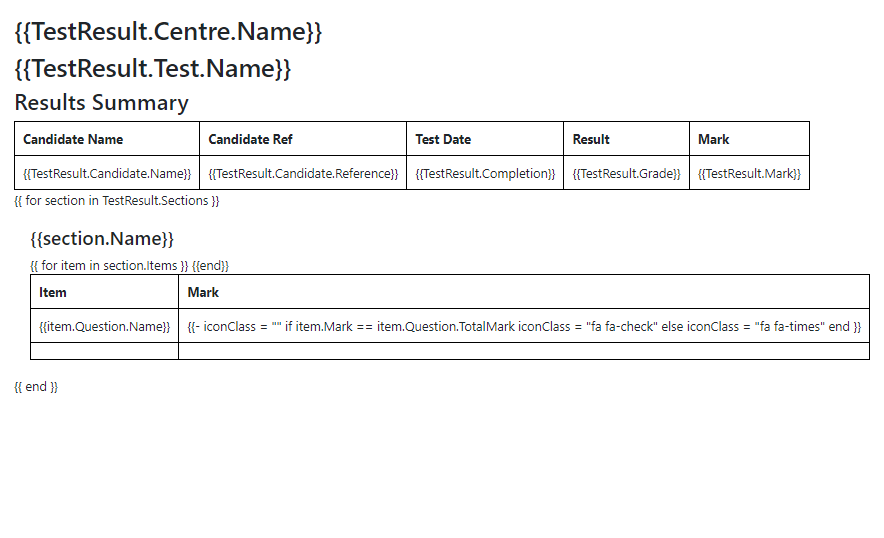
For an example of a report generated from this template, read the ‘View sample response body’ section of CustomReportGeneration API.
Response schema
The response schema contains a description of every property that can be returned for this endpoint.
count integer
Details how many custom report templates there are in total. This is null because the information retrieved is for a specific custom report template.
top integer
Details number of custom report templates returned in the response. This is null because the information retrieved is for a specific custom report template.
skip integer
Details how many custom report templates were skipped to display those in the response. This is null because the information retrieved is for a specific custom report template.
pageCount integer
Details how many pages of custom report templates there are. This is null because the information retrieved is for a specific custom report template.
nextPageLink string
The endpoint to call the next page of custom report templates. This is null because the information retrieved is for a specific custom report template.
prevPageLink string
The endpoint to call the previous page of custom report templates. This is null because the information retrieved is for a specific custom report template.
response array
Contains the rest of the response.
id integer
The custom report template’s unique identifier.
reference string
The custom report template’s unique reference code.
name string
The custom report template’s name.
entities array
Contains the custom report template’s entities’ information.
TestResult is currently the only available entity. For more information on the information available in the custom report entities, read ‘Custom report entities’ in CustomReportGeneration API.
templatingEngine enumeration
The templating engine used for the custom report template. Currently, the only available engine is Scriban.
creationDate string
The date the custom report template was created, in YYYY/MM/SSTHH:MM:SS format.
templateFile object
Contains the information for the custom report template’s HTML file.
templateFile/id integer
The HTML file’s unique identifier.
templateFile/name string
The HTML file’s name and file extension.
templateFile/url string
The endpoint used to generate the custom report template.
templateFile/path string
The HTML file’s file path.
emailSubject string
The subject line of the email sent to candidates, if the Custom Reports site setting is enabled for reports to be automatically sent to candidates.
emailBody string
The email body of the email sent to candidates, if the Custom Reports site setting is enabled for reports to be automatically sent to candidates.
isEmailBodyRtl Boolean
Determines whether email body uses right-to-left (true) or left-to-right (false) text direction, if the Custom Reports site setting is enabled for reports to be automatically sent to candidates.
isImageIncluded Boolean
Determines whether an image of the report is included at the bottom of the email sent to candidates, if the Custom Reports site setting is enabled for reports to be automatically sent to candidates.
errors string
Information about any errors that occurred during the request.
serverTimeZone enumeration
The timezone of the server sending the response.
Deleting a custom report template
Send a request to the endpoint to delete a specific custom report template. No request body is required.
Parameters
Parameters are passed with the endpoint to influence the response. Header parameters are included in the request header. Path parameters are extensions of the endpoint, and query parameters follow ? after any path parameters.
|
Name |
Parameter |
Input |
Description |
|---|---|---|---|
|
authorization |
header OPTIONAL |
Basic {credentials} |
Basic authentication details must be passed to authorise the user’s request, where {credentials} is a Base64 encoded username:password string. |
|
authorization |
header OPTIONAL |
Bearer {token} |
A bearer token must be passed to authorise the user’s request, where {token} is a JWT (JSON web token). |
|
accept |
header OPTIONAL |
application/json or application/xml |
Determines data format of the response, which can be either JSON or XML. |
|
id |
path OPTIONAL |
/api/v2/CustomReport/{id} |
Deletes specified custom report template, where {id} is the custom report template’s unique identifier. |
|
reference |
path OPTIONAL |
/api/v2/CustomReport/{reference} |
Deletes specified custom report template, where {reference} is the custom report template’s unique reference code. |
Sample response
If successful, the HTTP status code will be 200 and the response body will confirm the custom report template has been deleted by returning a null id.
{
"id": null,
"href": null,
"errors": null,
"serverTimeZone": null
}Error Codes
Refer to the following table for information on error codes that may be encountered when using this resource.
|
Name |
Code |
Description |
|---|---|---|
|
InternalServer |
1 |
Internal server error. |
|
Unauthorized |
3 |
The request has been sent by an unauthorised user. |
|
IncorrectFieldFormat |
4 |
A field in the request has not been completed in the correct format. |
|
InaccessibleOperation |
5 |
The request has been sent by a user with invalid permissions. |
|
InaccessibleData |
6 |
The request has been sent by a user with invalid permissions. |
|
MissingBody |
7 |
There is an issue with the request body. |
|
InvalidReference |
11 |
The unique reference code used in the request is invalid. |
|
InvalidInputParameters |
15 |
There is an issue with the path or query parameters. |
|
InvalidId |
16 |
The ID number used in the request is invalid. |
|
InvalidODataOperation |
19 |
There is an issue with the query parameters. |
|
BadRequest |
20 |
There is an issue with the /api/v2/CustomReport?$skip={skip} query parameter, where {skip} is a number that should not exceed the total number of responses. |
|
CustomReportCreateTemplateError |
210 |
There is an issue with creating the custom report template. |
|
CustomReportDeleteTemplateError |
211 |
There is an issue with deleting the custom report template. |
|
CustomReportGetTemplateError |
212 |
There is an issue with retrieving the custom report template. |
|
CustomReportDoesNotExist |
213 |
The custom report template specified in the request does not exist. |
Further reading
Read the following articles to learn more about similar APIs, how to get started with the Surpass API v2, and how to get the best out of this reference documentation: