
Candidate Management
In Scheduler, candidates can be scheduled for tests or given access to the booking portal to book their own tests. Candidates are referred to as ‘students’ in Scheduler.
This article explains what calls can be made to the Scheduler API using the candidate management resource.
Import this API into your Postman Workspace
In This Article
Integration Flow
The following diagram shows the Candidate Management integration flow:
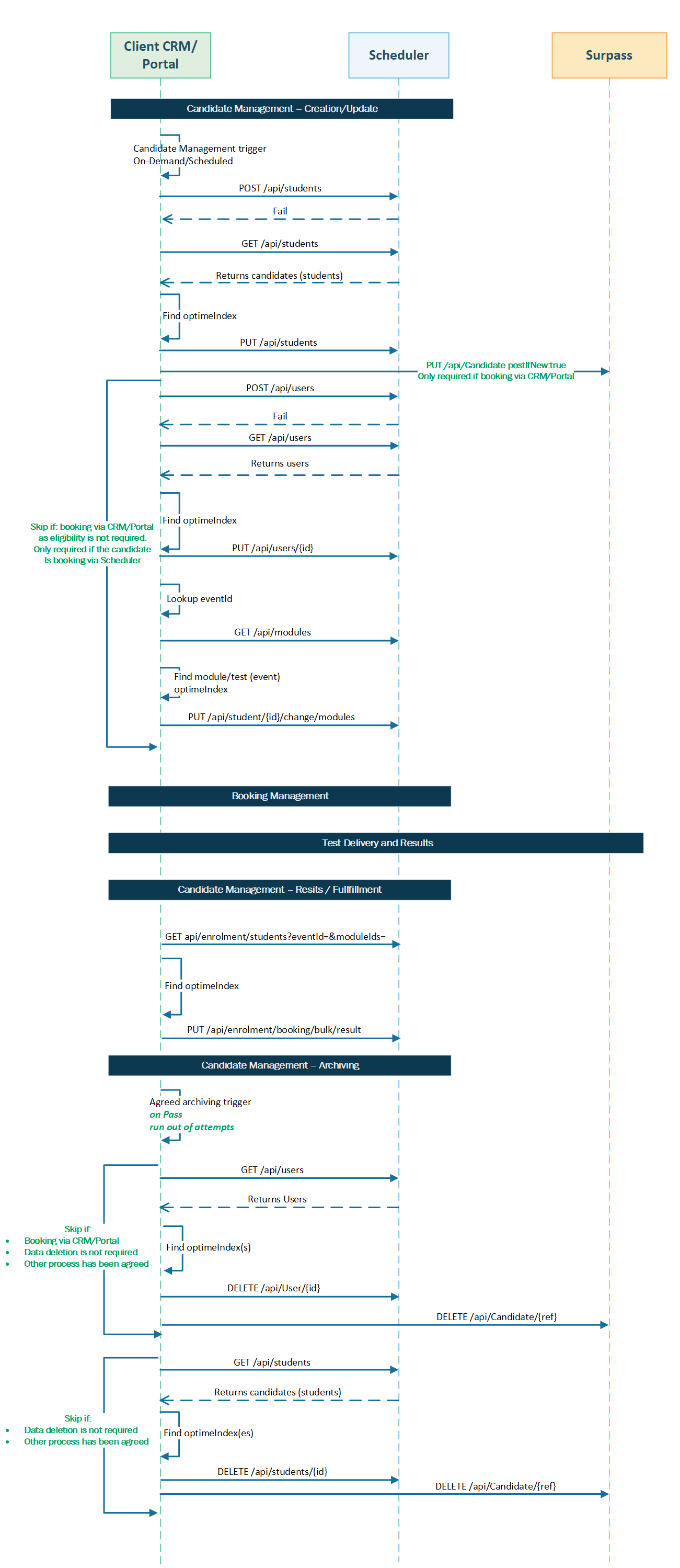
Creating a candidate's user account first, by sending a POST request to the /users endpoint with userType set to Student, also creates a candidate (student) reference. Use the OptimeIndex identifier from the POST request response (from the userIndex property) to update the candidate in a PUT request to the /Students endpoint to assign the candidate (student) its details, such as forename and surname.
Candidates (Students)
Candidates can be scheduled for tests and are managed in the Data > Organisation > Candidates screen. The Students endpoint can be used to list, retrieve, create, update, and delete candidates.
Listing candidates
Send a request to the endpoint to retrieve a list of candidates. Refer to the available parameters to influence the response. No request body is required.
Parameters
Parameters are passed with the endpoint to influence the response. Header parameters are included in the request header. Path parameters are extensions of the endpoint, and query parameters follow ? after any path parameters.
|
Name |
Parameter |
Input |
Description |
|---|---|---|---|
|
authorization |
header MANDATORY |
Bearer {token} |
A bearer token must be passed to authorise the user’s request, where {token} is the token string. |
|
accept |
header MANDATORY |
application/json |
Determines data format of the response, which must be JSON. |
|
take |
query OPTIONAL |
/api/Students?$take={take} |
Defines number of responses to return when paging a response, where {take} is a number between 1 and 150. |
Sample response
If successful, the HTTP status code will be 200 and the response body will contain the information in JSON format as requested.
{
    "reference": "1",
    "nextUrl": "null",
    "data": [
        {
            "departmentIds": [
                1,
                2
            ],
            "departments": [],
            "image": null,
            "forename": "Sanjib",
            "surname": "Datta",
            "address": "",
            "email": "sanjib.datta@surpass.com",
            "aspNetUserId": null,
            "telephone": "",
            "dateOfBirth": "1981-07-15",
            "isExternalFunded": false,
            "isResitPaymentRequired": false,
            "isDeleteImage": false,
            "firm": "",
            "tenancyUserId": 1,
            "roomId": null,
            "canMissEvents": false,
            "welfare": false,
            "accessLevelId": null,
            "accessLevel": null,
            "groupIds": [],
            "groups": [],
            "eventIds": [],
            "events": [],
            "modules": [],
            "moduleIds": [
                1,
                2,
                3
            ],
            "attributeIds": [],
            "attributes": [],
            "courseIds": [],
            "courses": [],
            "edit": true,
            "delete": true,
            "colour": "#A193A8",
            "groupId": null,
            "group": null,
            "status": "Active",
            "leavingDate": null,
            "partner": "",
            "reasonableAdjPercentage": null,
            "reasonableAdjMins": 10,
            "breakMins": 0,
            "gender": null,
            "nationality": null,
            "qualificationCountry": null,
            "timezone": null,
            "isArchived": false,
            "eventAcceptanceStatus": null,
            "weeks": null,
            "courseStartDate": null,
            "courseFinishDate": null,
            "callForCourseDate": null,
            "courseHistory": [],
            "studentIsNoLongerAttending": false,
            "studentIsNotYetStarted": false,
            "studentIsFinished": false,
            "canMoveEvent": true,
            "canMoveRoom": true,
            "customFields": null,
            "id": "Candidate1",
            "description": "Sanjib Datta",
            "altId": null,
            "optimeIndex": 1,
            "createUser": "1a464fd7-e0b1-44bc-8388-503bebb4637d",
            "createDate": "2024-07-31T08:44:43.967711",
            "changeUser": "fa8d0dcc-3a36-4a8a-9d86-6244c14b1e4c",
            "changeDate": "2024-12-02T09:12:50.7489855",
            "messages": []
        }
    ]
}
...
Response schema
The response schema contains a description of various properties that can be returned for this endpoint. For a full API reference, contact your Surpass Customer Success Manager.
nextUrl string
The endpoint to call the next page of records, which is the following query: /api/students?reference={reference}, where {reference} is the OptimeIndex identifier of the last record. There can be up to 150 records per page.
nextUrl does not prioritise accessible records over inaccessible ones when paginating. As a result, records you have permission to view may appear on later pages.
If null, the response is the last page of records.
data/departmentIds array
The unique OptimeIndex identifiers of any departments the candidate is registered at.
data/forename string
The candidate’s first name.
data/surname string
The candidate’s surname.
data/email string
The candidate’s email address.
data/dateOfBirth string
The candidate’s date of birth, in YYYY-MM-DD format.
data/moduleIds array
The unique OptimeIndex identifiers of any modules the candidate is eligible for.
data/reasonableAdjPercentage integer
The amount of additional time given to the candidate as a reasonable adjustment, as a percentage of the overall test time.
data/reasonableAdjMins integer
The amount of additional time given to the candidate as a reasonable adjustment, in minutes.
data/breakMins integer
If breaks are enabled for the test, the amount of time available for a candidate’s break, in minutes.
data/canMoveEvent Boolean
Determines whether the candidate can change their test booking (true) or not (false).
data/canMoveRoom Boolean
Determines whether the candidate can move the location and/or time of their test booking (true) or not (false).
data/id string
The candidate’s unique reference code.
data/description string
A descriptive code for the candidate, similar to a unique reference code.
data/optimeIndex integer
The candidate’s unique OptimeIndex identifier.
Retrieving candidate information
Send a request to the endpoint to retrieve information for a specific candidate using its ID. No request body is required.
Parameters
Parameters are passed with the endpoint to influence the response. Header parameters are included in the request header. Path parameters are extensions of the endpoint, and query parameters follow ? after any path parameters.
|
Name |
Parameter |
Input |
Description |
|---|---|---|---|
|
authorization |
header MANDATORY |
Bearer {token} |
A bearer token must be passed to authorise the user’s request, where {token} is the token string. |
|
accept |
header MANDATORY |
application/json |
Determines data format of the response, which must be JSON. |
|
id |
path OPTIONAL |
/api/Students/{studentId} |
Returns information for the specified candidate, where {studentId} is the candidate’s unique OptimeIndex identifier. |
Sample response
If successful, the HTTP status code will be 200 and the response body will contain the information in JSON format as requested.
{
    "departmentIds": [
        1,
        2
    ],
    "departments": [],
    "image": null,
    "forename": "Sanjib",
    "surname": "Datta",
    "address": "",
    "email": "sanjib.datta@surpass.com",
    "aspNetUserId": null,
    "telephone": "",
    "dateOfBirth": "1981-07-15",
    "isExternalFunded": false,
    "isResitPaymentRequired": false,
    "isDeleteImage": false,
    "firm": "",
    "tenancyUserId": 1,
    "roomId": null,
    "canMissEvents": false,
    "welfare": false,
    "accessLevelId": null,
    "accessLevel": null,
    "groupIds": [],
    "groups": [],
    "eventIds": [],
    "events": [],
    "modules": [],
    "moduleIds": [
        1,
        2,
        3
    ],
    "attributeIds": [],
    "attributes": [],
    "courseIds": [],
    "courses": [],
    "edit": true,
    "delete": true,
    "colour": "#A193A8",
    "groupId": null,
    "group": null,
    "status": "Active",
    "leavingDate": null,
    "partner": "",
    "reasonableAdjPercentage": null,
    "reasonableAdjMins": 10,
    "breakMins": 0,
    "gender": null,
    "nationality": null,
    "qualificationCountry": null,
    "timezone": null,
    "isArchived": false,
    "eventAcceptanceStatus": null,
    "weeks": null,
    "courseStartDate": null,
    "courseFinishDate": null,
    "callForCourseDate": null,
    "courseHistory": [],
    "studentIsNoLongerAttending": false,
    "studentIsNotYetStarted": false,
    "studentIsFinished": false,
    "canMoveEvent": true,
    "canMoveRoom": true,
    "customFields": null,
    "id": "Candidate1",
    "description": "Sanjib Datta",
    "altId": null,
    "optimeIndex": 1,
    "createUser": "1a464fd7-e0b1-44bc-8388-503bebb4637d",
    "createDate": "2024-07-31T08:44:43.967711",
    "changeUser": "fa8d0dcc-3a36-4a8a-9d86-6244c14b1e4c",
    "changeDate": "2024-12-02T09:12:50.7489855",
    "messages": []
}Response schema
The response schema contains a description of various properties that can be returned for this endpoint. For a full API reference, contact your Surpass Customer Success Manager.
departmentIds array
The unique OptimeIndex identifiers of any departments the candidate is registered at.
forename string
The candidate’s first name.
surname string
The candidate’s surname.
address string
The candidate’s address.
email string
The candidate’s email address.
dateOfBirth string
The candidate’s date of birth, in YYYY-MM-DD format.
reasonableAdjPercentage integer
The amount of additional time given to the candidate as a reasonable adjustment, as a percentage of the overall test time.
reasonableAdjMins integer
The amount of additional time given to the candidate as a reasonable adjustment, in minutes.
breakMins integer
If breaks are enabled for the test, the amount of time available for a candidate’s break, in minutes.
canMoveEvent Boolean
Determines whether the candidate can change their test booking (true) or not (false).
canMoveRoom Boolean
Determines whether the candidate can move the location and/or time of their test booking (true) or not (false).
id string
The candidate’s unique reference code.
description string
A descriptive code for the candidate, similar to a unique reference code.
optimeIndex integer
The candidate’s unique OptimeIndex identifier.
Creating a candidate
Send a request to the endpoint to create a candidate.
Parameters
Parameters are passed with the endpoint to influence the response. Header parameters are included in the request header. Path parameters are extensions of the endpoint, and query parameters follow ? after any path parameters.
|
Name |
Parameter |
Input |
Description |
|---|---|---|---|
|
authorization |
header MANDATORY |
Bearer {token} |
A bearer token must be passed to authorise the user’s request, where {token} is the token string. |
|
content-type |
header MANDATORY |
application/json |
Determines data format of the request, which must be JSON. |
|
accept |
header MANDATORY |
application/json |
Determines data format of the response, which must be JSON. |
Sample request
The following is a sample request body to create a candidate.
{
    "id": "1",
    "description": "Candidate1",
    "departmentIds": [1],
    "forename": "Sanjib",
    "surname": "Datta",
    "address": "",
    "email": "sanjib.datta@surpass.com",
    "dateOfBirth": "1981-07-15",
    "reasonableAdjustment": 10,
    "canMoveEvent": true,
    "canMoveRoom": true
}Request body schema
The request body schema contains a description of various properties that can be passed with this endpoint. For a full API reference, contact your Surpass Customer Success Manager.
id string
The candidate’s unique reference code.
description string
A descriptive code for the candidate, similar to a unique reference code.
departmentIds array
The unique OptimeIndex identifiers of any departments the candidate is registered at.
forename string
The candidate’s first name.
surname string
The candidate’s surname.
address string
The candidate’s address.
email string
The candidate’s email address.
dateOfBirth string
The candidate’s date of birth, in YYYY-MM-DD format.
reasonableAdjPercentage integer
The amount of additional time given to the candidate as a reasonable adjustment, as a percentage of the overall test time. Only pass one of reasonableAdjPercentage or reasonableAdjMins.
reasonableAdjMins integer
The amount of additional time given to the candidate as a reasonable adjustment, in minutes. Only pass one of reasonableAdjPercentage or reasonableAdjMins.
breakMins integer
If breaks are enabled for the test, the amount of time available for a candidate’s break, in minutes.
canMoveEvent Boolean
Determines whether the candidate can change their test booking (true) or not (false).
canMoveRoom Boolean
Determines whether the candidate can move the location and/or time of their test booking (true) or not (false).
Sample response
If successful, the HTTP status code will be 200 and the response body will contain the new candidate’s details.
{
    "departmentIds": [
        1
    ],
    "departments": [],
    "image": null,
    "forename": "Sanjib",
    "surname": "Datta",
    "address": null,
    "email": "sanjib.datta@surpass.com",
    "aspNetUserId": null,
    "telephone": null,
    "dateOfBirth": "1990-06-20",
    "isExternalFunded": null,
    "isResitPaymentRequired": null,
    "isDeleteImage": false,
    "firm": null,
    "tenancyUserId": null,
    "roomId": null,
    "canMissEvents": null,
    "welfare": null,
    "accessLevelId": null,
    "accessLevel": null,
    "groupIds": [],
    "groups": [],
    "eventIds": [],
    "events": [],
    "modules": [],
    "moduleIds": [],
    "attributeIds": [],
    "attributes": [],
    "courseIds": [],
    "courses": [],
    "edit": true,
    "delete": true,
    "colour": null,
    "groupId": null,
    "group": null,
    "status": null,
    "leavingDate": null,
    "partner": null,
    "reasonableAdjPercentage": null,
    "reasonableAdjMins": null,
    "breakMins": null,
    "gender": null,
    "nationality": null,
    "qualificationCountry": null,
    "timezone": null,
    "isArchived": false,
    "eventAcceptanceStatus": null,
    "weeks": null,
    "courseStartDate": null,
    "courseFinishDate": null,
    "callForCourseDate": null,
    "courseHistory": [],
    "studentIsNoLongerAttending": false,
    "studentIsNotYetStarted": false,
    "studentIsFinished": false,
    "canMoveEvent": true,
    "canMoveRoom": true,
    "customFields": null,
    "id": "1",
    "description": "Candidate1",
    "altId": null,
    "optimeIndex": 1,
    "createUser": "68a89dd6-52b1-42de-b6ff-195a09b27490",
    "createDate": "2025-06-10T10:59:19.584734",
    "changeUser": null,
    "changeDate": null,
    "messages": [
        {
            "message": "Successfully created student",
            "messageType": 0
        }
    ]
}
Updating a candidate
Send a request to the endpoint to update a specific candidate.
Parameters
Parameters are passed with the endpoint to influence the response. Header parameters are included in the request header. Path parameters are extensions of the endpoint, and query parameters follow ? after any path parameters.
|
Name |
Parameter |
Input |
Description |
|---|---|---|---|
|
authorization |
header MANDATORY |
Bearer {token} |
A bearer token must be passed to authorise the user’s request, where {token} is the token string. |
|
content-type |
header MANDATORY |
application/json |
Determines data format of the request, which must be JSON. |
|
accept |
header MANDATORY |
application/json |
Determines data format of the response, which must be JSON. |
|
id |
path MANDATORY |
/api/Students/{studentId} |
Update specified candidate, where {studentId} is the candidate’s unique OptimeIndex identifier. |
Sample request
At least one property must be updated in the request. The following is a sample request body to update a candidate. Refer to the request body schema for more properties that can be updated.
{
    "optimeIndex": 1,
    "id": "1",
    "description": "Candidate1",
    "departmentIds": [1],
    "forename": "Sanjib",
    "surname": "Datta",
    "address": "",
    "email": "sanjib.datta@surpass.com",
    "dateOfBirth": "1981-07-15",
    "reasonableAdjustment": 10,
    "canMoveEvent": true,
    "canMoveRoom": true
}Request body schema
The request body schema contains a description of various properties that can be passed with this endpoint. For a full API reference, contact your Surpass Customer Success Manager.
optimeIndex integer
The candidate’s unique OptimeIndex identifier.
id string
The candidate’s unique reference code.
description string
A descriptive code for the candidate, similar to a unique reference code.
departmentIds array
The unique OptimeIndex identifiers of any departments the candidate is registered at.
forename string
The candidate’s first name.
surname string
The candidate’s surname.
address string
The candidate’s address.
email string
The candidate’s email address.
dateOfBirth string
The candidate’s date of birth, in YYYY-MM-DD format.
reasonableAdjPercentage integer
The amount of additional time given to the candidate as a reasonable adjustment, as a percentage of the overall test time. Only pass one of reasonableAdjPercentage or reasonableAdjMins.
reasonableAdjMins integer
The amount of additional time given to the candidate as a reasonable adjustment, in minutes. Only pass one of reasonableAdjPercentage or reasonableAdjMins.
breakMins integer
If breaks are enabled for the test, the amount of time available for a candidate’s break, in minutes.
canMoveEvent Boolean
Determines whether the candidate can change their test booking (true) or not (false).
canMoveRoom Boolean
Determines whether the candidate can move the location and/or time of their test booking (true) or not (false).
Sample response
If successful, the HTTP status code will be 200 and the response body will contain the updated candidate’s details.
{
    "departmentIds": [
        1
    ],
    "departments": [],
    "image": null,
    "forename": "Sanjib",
    "surname": "Datta",
    "address": null,
    "email": "datta.sanjib@surpass.com",
    "aspNetUserId": null,
    "telephone": null,
    "dateOfBirth": "1990-06-20",
    "isExternalFunded": null,
    "isResitPaymentRequired": null,
    "isDeleteImage": false,
    "firm": null,
    "tenancyUserId": null,
    "roomId": null,
    "canMissEvents": null,
    "welfare": null,
    "accessLevelId": null,
    "accessLevel": null,
    "groupIds": [],
    "groups": [],
    "eventIds": [],
    "events": [],
    "modules": [],
    "moduleIds": [],
    "attributeIds": [],
    "attributes": [],
    "courseIds": [],
    "courses": [],
    "edit": true,
    "delete": true,
    "colour": null,
    "groupId": null,
    "group": null,
    "status": null,
    "leavingDate": null,
    "partner": null,
    "reasonableAdjPercentage": null,
    "reasonableAdjMins": null,
    "breakMins": null,
    "gender": null,
    "nationality": null,
    "qualificationCountry": null,
    "timezone": null,
    "isArchived": false,
    "eventAcceptanceStatus": null,
    "weeks": null,
    "courseStartDate": null,
    "courseFinishDate": null,
    "callForCourseDate": null,
    "courseHistory": [],
    "studentIsNoLongerAttending": false,
    "studentIsNotYetStarted": false,
    "studentIsFinished": false,
    "canMoveEvent": true,
    "canMoveRoom": true,
    "customFields": null,
    "id": "1",
    "description": "Candidate1",
    "altId": null,
    "optimeIndex": 1,
    "createUser": "68a89dd6-52b1-42de-b6ff-195a09b27490",
    "createDate": "2025-06-10T10:59:19.584734",
    "changeUser": null,
    "changeDate": null,
    "messages": [
        {
            "message": "Successfully updated student",
            "messageType": 0
        }
    ]
}
Deleting a candidate
Send a request to the endpoint to delete a specific candidate. No request body is required.
Parameters
Parameters are passed with the endpoint to influence the response. Header parameters are included in the request header. Path parameters are extensions of the endpoint, and query parameters follow ? after any path parameters.
|
Name |
Parameter |
Input |
Description |
|---|---|---|---|
|
authorization |
header MANDATORY |
Basic {credentials} |
Basic authentication details must be passed to authorise the user’s request, where {credentials} is a Base64 encoded username:password string. |
|
accept |
header MANDATORY |
application/json |
Determines data format of the response, which must be JSON. |
|
id |
path MANDATORY |
/api/Students/{studentId} |
Deletes specified candidate, where {studentId} is the candidate’s unique OptimeIndex identifier. |
Sample response
If successful, the HTTP status code will be 200 and the response body will confirm the candidate has been deleted.
{
    "messages": [
        {
            "message": "Successfully deleted student",
            "messageType": 0
        }
    ]
}
Candidate user accounts (Users)
Candidates can also have their own user accounts, managed in the Data > User Management > Users screen, if they are given access to the booking portal to book their own tests. Candidate user accounts must be associated with corresponding candidate references (students).
The Users endpoint can be used to list, retrieve, create, and update candidate user accounts.
Listing candidate user accounts
Send a request to the endpoint to retrieve a list of users. Refer to the available parameters to influence the response. No request body is required.
Parameters
Parameters are passed with the endpoint to influence the response. Header parameters are included in the request header. Path parameters are extensions of the endpoint, and query parameters follow ? after any path parameters.
|
Name |
Parameter |
Input |
Description |
|---|---|---|---|
|
authorization |
header MANDATORY |
Bearer {token} |
A bearer token must be passed to authorise the user’s request, where {token} is the token string. |
|
accept |
header MANDATORY |
application/json |
Determines data format of the response, which must be JSON. |
|
take |
query OPTIONAL |
/api/Users/Dropdown?$take={take} |
Defines number of responses to return when paging a response, where {take} is a number between 1 and 150. |
Sample response
If successful, the HTTP status code will be 200 and the response body will contain the information in JSON format as requested.
{
    "id": "1",
    "email": "sanjib.datta@surpass.com",
    "altCalendarSyncEmail": "",
    "preferredEmail": null,
    "role": "Staff",
    "roleId": "888876d5-c967-4689-b8fe-a7182b7c9272",
    "bookerRole": null,
    "examRole": null,
    "ceremoniesRole": null,
    "forename": "Sanjib",
    "surname": "Datta",
    "image": null,
    "description": null,
    "userIndex": 1,
    "userType": "Student",
    "userId": "SanjibDatta",
    "isInviteReceived": false,
    "loginCount": 1,
    "isOAuth": false,
    "samlSettingsId": null,
    "isLockoutEnabled": false,
    "lockoutEnd": null,
    "isExternalFunded": false,
    "tenancyUserId": 1,
    "lastLoginDate": "2024-08-28T08:55:00",
    "hasAcceptedTerms": false,
    "accessArchive": false,
    "viewArchive": false,
    "parentDepartmentIds": [],
    "parentDepartments": [],
    "departmentIds": [
        1
    ],
    "departments": [
        {
            "colour": null,
            "parentId": null,
            "parent": null,
            "isEligibilityEnabled": false,
            "allowAnonymousBookingView": false,
            "isPORequired": false,
            "ownerIds": null,
            "owners": null,
            "staffDepartments": null,
            "roomDepartments": null,
            "buildingDepartments": null,
            "studentDepartments": null,
            "departmentEnrolmentResultTypes": null,
            "childDepartments": null,
            "edit": false,
            "delete": false,
            "hideInLists": false,
            "customFields": null,
            "id": "1",
            "description": "User1",
            "altId": null,
            "optimeIndex": 1,
            "createUser": null,
            "createDate": null,
            "changeUser": null,
            "changeDate": null,
            "messages": []
        }
    ],
    "courseTypeIds": [],
    "courseTypes": [],
    "moduleTypeIds": [],
    "moduleTypes": [],
    "language": "en",
    "twoFactorEnabled": false,
    "edit": false,
    "insert": false,
    "delete": false,
    "createUser": null,
    "createDate": null,
    "changeUser": "sanjib.datta@surpass.com",
    "changeDate": "2024-08-28T09:55:00",
    "messages": []
}
...Response schema
The response schema contains a description of various properties that can be returned for this endpoint. For a full API reference, contact your Surpass Customer Success Manager.
id string
The candidate user account’s unique reference code, which is equivalent to an optimeIndex identifier.
email string
The candidate user account’s email address.
role enumeration
The user’s role, which is one of Staff or Student (candidate user account).
roleId string
The role’s unique reference code.
forename string
The candidate’s first name.
surname string
The candidate’s surname.
userType enumeration
The user’s user type, which is one of Staff or Student (candidate user account).
lastLoginDate string
The date the candidate last logged in, in YYYY-MM-DDTHH:MM:SS format.
departmentIds array
The unique OptimeIndex identifiers of any departments the candidate is registered at.
departments array
Contains information for the departments the candidate is registered at.
departments/id string
The department’s unique reference code.
departments/description string
A descriptive code for the department, similar to a unique reference code.
departments/optimeIndex integer
The department’s unique OptimeIndex identifier.
twoFactorEnabled Boolean
Determines whether Two-Factor Authentication (2FA) is enabled (true) or not (false).
Retrieving candidate user account information
Send a request to the endpoint to retrieve information for a specific candidate user account using their ID. No request body is required.
Parameters
Parameters are passed with the endpoint to influence the response. Header parameters are included in the request header. Path parameters are extensions of the endpoint, and query parameters follow ? after any path parameters.
|
Name |
Parameter |
Input |
Description |
|---|---|---|---|
|
authorization |
header MANDATORY |
Bearer {token} |
A bearer token must be passed to authorise the user’s request, where {token} is the token string. |
|
accept |
header MANDATORY |
application/json |
Determines data format of the response, which must be JSON. |
|
id |
path OPTIONAL |
/api/Users/{userId} |
Returns information for the specified candidate user account, where {userId} is the candidate user account’s unique reference code. |
Sample response
If successful, the HTTP status code will be 200 and the response body will contain the information in JSON format as requested.
{
    "id": "1",
    "email": "sanjib.datta@surpass.com",
    "altCalendarSyncEmail": "",
    "preferredEmail": null,
    "role": "Student",
    "roleId": "888876d5-c967-4689-b8fe-a7182b7c9272",
    "bookerRole": null,
    "examRole": null,
    "ceremoniesRole": null,
    "forename": "Sanjib",
    "surname": "Datta",
    "image": null,
    "description": null,
    "userIndex": 1,
    "userType": "Student",
    "userId": "SanjibDatta",
    "isInviteReceived": false,
    "loginCount": 1,
    "isOAuth": false,
    "samlSettingsId": null,
    "isLockoutEnabled": false,
    "lockoutEnd": null,
    "isExternalFunded": false,
    "tenancyUserId": 1,
    "lastLoginDate": "2024-08-28T08:55:00",
    "hasAcceptedTerms": false,
    "accessArchive": false,
    "viewArchive": false,
    "parentDepartmentIds": [],
    "parentDepartments": [],
    "departmentIds": [
        1
    ],
    "departments": [
        {
            "colour": null,
            "parentId": null,
            "parent": null,
            "isEligibilityEnabled": false,
            "allowAnonymousBookingView": false,
            "isPORequired": false,
            "ownerIds": null,
            "owners": null,
            "staffDepartments": null,
            "roomDepartments": null,
            "buildingDepartments": null,
            "studentDepartments": null,
            "departmentEnrolmentResultTypes": null,
            "childDepartments": null,
            "edit": false,
            "delete": false,
            "hideInLists": false,
            "customFields": null,
            "id": "1",
            "description": "User1",
            "altId": null,
            "optimeIndex": 1,
            "createUser": null,
            "createDate": null,
            "changeUser": null,
            "changeDate": null,
            "messages": []
        }
    ],
    "courseTypeIds": [],
    "courseTypes": [],
    "moduleTypeIds": [],
    "moduleTypes": [],
    "language": "en",
    "twoFactorEnabled": false,
    "edit": false,
    "insert": false,
    "delete": false,
    "createUser": null,
    "createDate": null,
    "changeUser": "sanjib.datta@surpass.com",
    "changeDate": "2024-08-28T09:55:00",
    "messages": []
}Response schema
The response schema contains a description of various properties that can be returned for this endpoint. For a full API reference, contact your Surpass Customer Success Manager.
id string
The candidate user account’s unique reference code, which is equivalent to an OptimeIndex identifier.
email string
The candidate user account’s email address.
role enumeration
The user’s role, which is one of Staff or Student (candidate user account).
roleId string
The role’s unique reference code.
forename string
The candidate’s first name.
surname string
The candidate’s surname.
userType enumeration
The user’s user type, which is one of Staff or Student (candidate user account).
lastLoginDate string
The date the candidate last logged in, in YYYY-MM-DDTHH:MM:SS format.
departmentIds array
The unique OptimeIndex identifiers of any departments the candidate user account is registered at.
departments array
Contains information for the departments the candidate user account is registered at.
departments/id string
The department’s unique reference code.
departments/description string
A descriptive code for the department, similar to a unique reference code.
departments/optimeIndex integer
The department’s unique OptimeIndex identifier.
twoFactorEnabled Boolean
Determines whether Two-Factor Authentication (2FA) is enabled (true) or not (false).
Creating a candidate user account
Send a request to the endpoint to create a candidate user account.
Parameters
Parameters are passed with the endpoint to influence the response. Header parameters are included in the request header. Path parameters are extensions of the endpoint, and query parameters follow ? after any path parameters.
|
Name |
Parameter |
Input |
Description |
|---|---|---|---|
|
authorization |
header MANDATORY |
Bearer {token} |
A bearer token must be passed to authorise the user’s request, where {token} is the token string. |
|
content-type |
header MANDATORY |
application/json |
Determines data format of the request, which must be JSON. |
|
accept |
header MANDATORY |
application/json |
Determines data format of the response, which must be JSON. |
Sample request
The following is a sample request body to create a candidate user account.
{
    "email": "sanjib.datta@surpass.com",
    "role": "Student",
    "forename": "Sanjib",
    "surname": "Datta",
    "userIndex": "1",
    "userType": "Student",
    "departmentIds": [1],
    "isOAuth": false
}Request body schema
The request body schema contains a description of various properties that can be passed with this endpoint. For a full API reference, contact your Surpass Customer Success Manager.
email string
The candidate user account’s email address.
role enumeration
The user’s role, which is one of Staff or Student (candidate user account).
forename string
The candidate’s first name.
surname string
The candidate’s surname.
userIndex string
The unique OptimeIndex identifier of the candidate (student) you are associating the candidate user account with.
userType enumeration
The user’s user type, which is one of Staff or Student (candidate user account).
departmentIds array
The unique OptimeIndex identifiers of any departments the candidate user account is registered at.
is0Auth Boolean
Determines whether Single Sign-On (SSO) is enabled (true) or not (false). Defaults to false if omitted.
Sample response
If successful, the HTTP status code will be 200 and the response body will contain the new candidate user account’s details.
{
    "id": "1",
    "email": "sanjib.datta@surpass.com",
    "altCalendarSyncEmail": null,
    "preferredEmail": null,
    "role": "Student",
    "roleId": "1",
    "bookerRole": null,
    "examRole": null,
    "ceremoniesRole": null,
    "forename": "Sanjib",
    "surname": "Datta",
    "image": null,
    "description": null,
    "userIndex": 1,
    "userType": "Student",
    "userId": "1",
    "isInviteReceived": false,
    "loginCount": 0,
    "isOAuth": false,
    "samlSettingsId": null,
    "isLockoutEnabled": false,
    "lockoutEnd": null,
    "isExternalFunded": false,
    "tenancyUserId": 1,
    "lastLoginDate": null,
    "hasAcceptedTerms": false,
    "accessArchive": false,
    "viewArchive": false,
    "parentDepartmentIds": [],
    "parentDepartments": [],
    "departmentIds": [
        1
    ],
    "departments": [
        {
            "colour": null,
            "parentId": null,
            "parent": null,
            "isEligibilityEnabled": false,
            "allowAnonymousBookingView": false,
            "isPORequired": false,
            "ownerIds": null,
            "owners": null,
            "staffDepartments": null,
            "roomDepartments": null,
            "buildingDepartments": null,
            "studentDepartments": null,
            "departmentEnrolmentResultTypes": null,
            "childDepartments": null,
            "edit": false,
            "delete": false,
            "hideInLists": false,
            "customFields": null,
            "id": "SurpassDepartment",
            "description": "Surpass Department",
            "altId": null,
            "optimeIndex": 1,
            "createUser": null,
            "createDate": null,
            "changeUser": null,
            "changeDate": null,
            "messages": []
        }
    ],
    "courseTypeIds": [],
    "courseTypes": [],
    "moduleTypeIds": [],
    "moduleTypes": [],
    "language": null,
    "twoFactorEnabled": false,
    "edit": true,
    "insert": true,
    "delete": true,
    "createUser": "sanjib.datta@surpass.com",
    "createDate": "2025-06-10T12:08:00",
    "changeUser": null,
    "changeDate": null,
    "messages": []
}
Updating a candidate user account
Send a request to the endpoint to update a specific candidate user account.
Parameters
Parameters are passed with the endpoint to influence the response. Header parameters are included in the request header. Path parameters are extensions of the endpoint, and query parameters follow ? after any path parameters.
|
Name |
Parameter |
Input |
Description |
|---|---|---|---|
|
authorization |
header MANDATORY |
Bearer {token} |
A bearer token must be passed to authorise the user’s request, where {token} is the token string. |
|
content-type |
header MANDATORY |
application/json |
Determines data format of the request, which must be JSON. |
|
accept |
header MANDATORY |
application/json |
Determines data format of the response, which must be JSON. |
|
id |
path MANDATORY |
/api/Users/{userId} |
Update specified candidate user account, where {userId} is the candidate user account’s unique reference code. |
Sample request
At least one property must be updated in the request. The following is a sample request body to update a candidate user account. Refer to the request body schema for more properties that can be updated.
{
    "email": "datta.sanjib@surpass.com",
    "role": "Student",
    "forename": "Sanjib",
    "surname": "Datta",
    "userIndex": "1",
    "userType": "Student",
    "departmentIds": [1],
    "isOAuth": false
}Request body schema
The request body schema contains a description of various properties that can be passed with this endpoint. For a full API reference, contact your Surpass Customer Success Manager.
email string
The candidate user account’s email address.
role enumeration
The user’s role. Different roles have different permissions within Scheduler.
forename string
The candidate’s first name.
surname string
The candidate’s surname.
userIndex string
The unique OptimeIndex identifier of the candidate (student) you are associating the candidate user account with.
userType enumeration
The user’s user type, which is one of Staff or Student (candidate user account).
departmentIds array
The unique OptimeIndex identifiers of any departments the candidate user account is registered at.
is0Auth Boolean
Determines whether Single Sign-On (SSO) is enabled (true) or not (false).
Sample response
If successful, the HTTP status code will be 200 and the response body will contain the updated candidate user account’s details.
{
    "id": "1",
    "email": "datta@sanjib@surpass.com",
    "altCalendarSyncEmail": null,
    "preferredEmail": null,
    "role": "Student",
    "roleId": "1",
    "bookerRole": null,
    "examRole": null,
    "ceremoniesRole": null,
    "forename": "Sanjib",
    "surname": "Datta",
    "image": null,
    "description": null,
    "userIndex": 1,
    "userType": "Student",
    "userId": "1",
    "isInviteReceived": false,
    "loginCount": 0,
    "isOAuth": false,
    "samlSettingsId": null,
    "isLockoutEnabled": false,
    "lockoutEnd": null,
    "isExternalFunded": false,
    "tenancyUserId": 1,
    "lastLoginDate": null,
    "hasAcceptedTerms": false,
    "accessArchive": false,
    "viewArchive": false,
    "parentDepartmentIds": [],
    "parentDepartments": [],
    "departmentIds": [
        1
    ],
    "departments": [
        {
            "colour": null,
            "parentId": null,
            "parent": null,
            "isEligibilityEnabled": false,
            "allowAnonymousBookingView": false,
            "isPORequired": false,
            "ownerIds": null,
            "owners": null,
            "staffDepartments": null,
            "roomDepartments": null,
            "buildingDepartments": null,
            "studentDepartments": null,
            "departmentEnrolmentResultTypes": null,
            "childDepartments": null,
            "edit": false,
            "delete": false,
            "hideInLists": false,
            "customFields": null,
            "id": "SurpassDepartment",
            "description": "Surpass Department",
            "altId": null,
            "optimeIndex": 1,
            "createUser": null,
            "createDate": null,
            "changeUser": null,
            "changeDate": null,
            "messages": []
        }
    ],
    "courseTypeIds": [],
    "courseTypes": [],
    "moduleTypeIds": [],
    "moduleTypes": [],
    "language": null,
    "twoFactorEnabled": false,
    "edit": true,
    "insert": true,
    "delete": true,
    "createUser": "sanjib.datta@surpass.com",
    "createDate": "2025-06-10T12:08:00",
    "changeUser": null,
    "changeDate": null,
    "messages": []
}
Further reading
Read the following articles to learn more about the scheduling system or more about related APIs: