
Booking Management
In Scheduler, seats in test centres are booked for candidates. The Enrolment/Booking endpoints can be used to retrieve test booking information, book seats in test centres for candidates, change, and cancel test bookings.
This article explains what calls can be made to the Scheduler API using the booking management resource.
Import this API into your Postman Workspace
In This Article
Integration Flow
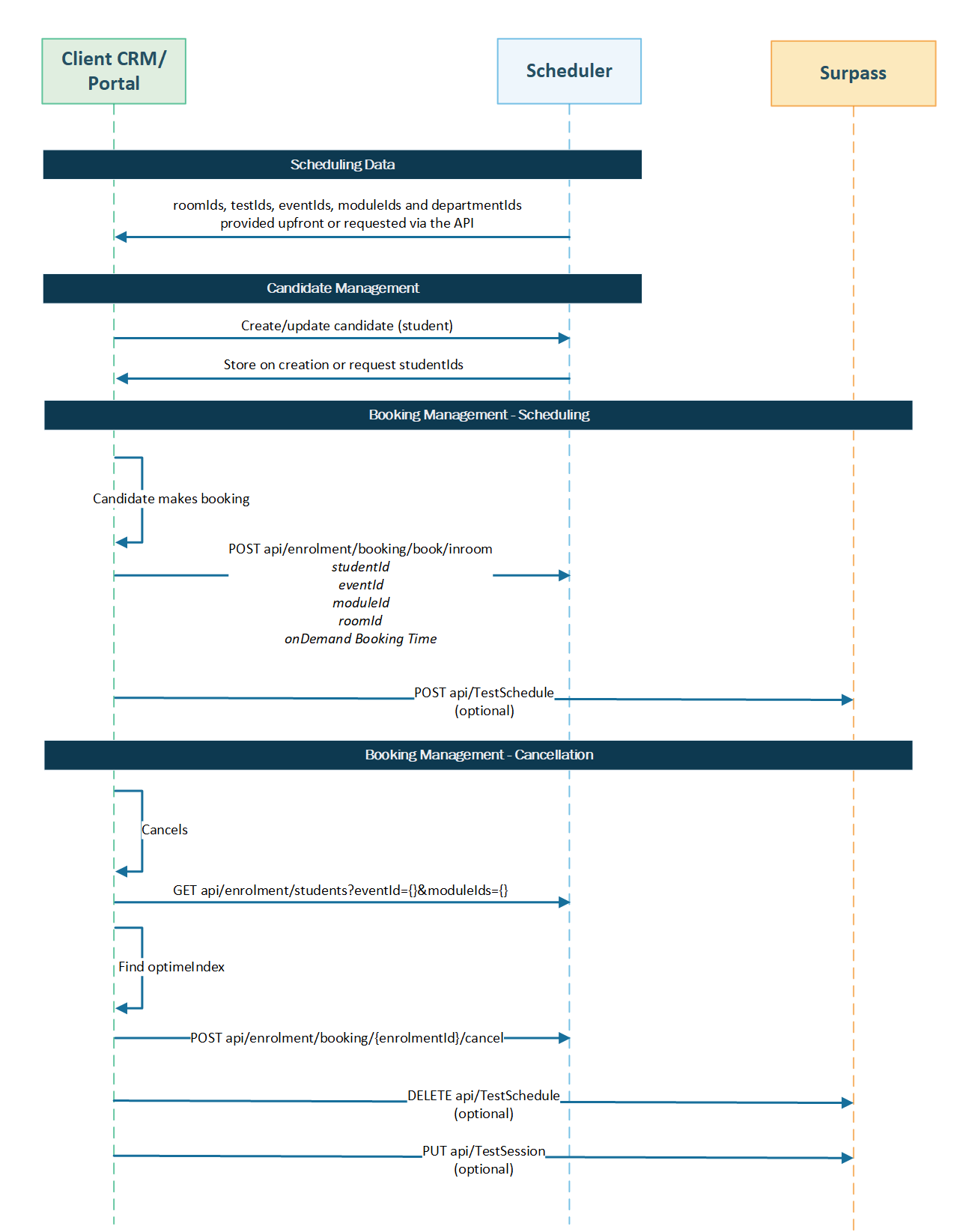
The following diagram shows the Booking Management integration flow:
Retrieving a candidate’s test booking information
Send a request to the endpoint to retrieve information for a specific candidate’s test booking (enrolment) using its ID. Refer to the available parameters to influence the response, including a request body.
Parameters
Parameters are passed with the endpoint to influence the response. Header parameters are included in the request header. Path parameters are extensions of the endpoint, and query parameters follow ? after any path parameters.
|
Name |
Parameter |
Input |
Description |
|---|---|---|---|
|
authorization |
header MANDATORY |
Bearer {token} |
A bearer token must be passed to authorise the user’s request, where {token} is the token string. |
|
content-type |
header MANDATORY |
multipart/form-data |
Determines that there is form data being passed in the request. |
|
accept |
header MANDATORY |
application/json |
Determines data format of the response, which must be JSON. |
|
id |
path OPTIONAL |
/api/Enrolment/Students?eventId={eventId} |
Returns information for the specified test booking, where {eventId} is the test’s unique OptimeIndex identifier. |
Sample request
The following is a sample request body to search for a department, which is made up of text-based form-data.
|
Name |
Key |
Input |
Description |
|---|---|---|---|
|
eventId |
text |
integer |
The test’s unique OptimeIndex identifier. |
|
includeEligibleStudents |
text |
Boolean |
Determines whether to only include eligible candidates (true) or not (false).
NOTE: This parameter is only applicable if eligibility is configured for the test booking.
|
|
moduleIds |
text |
integer |
The unique OptimeIndex identifier of the test booking’s module.
NOTE: This parameter is only applicable if eligibility is configured for the test booking.
|
Sample response
If successful, the HTTP status code will be 200 and the response body will contain the information in JSON format as requested.
{
    "bookedStudents": [
        {
            "optimeIndex": 1,
            "id": "TestBooking1",
            "forename": "Sanjib",
            "surname": "Datta",
            "image": null,
            "departmentIds": [
                1
            ],
            "eventId": 1,
            "roomId": 1,
            "bookedDate": "2024-08-28T08:15:00",
            "enrolmentDetails": {
                "optimeIndex": 1,
                "eventId": 1,
                "studentId": 1,
                "status": "Booked",
                "attemptNum": 1,
                "enrolmentResultType": null,
                "paymentModel": {
                    "paymentMethod": null,
                    "paymentResponsibility": null,
                    "paymentStatus": null,
                    "paymentDueBy": null,
                    "paymentUrl": null,
                    "paymentLink": null,
                    "paymentReference": "e6a5ec8a-13b9-4b8e-8fce-33c2e021a323",
                    "cost": null,
                    "isPaymentPending": false,
                    "stripeReference": null,
                    "stripePaymentMethodId": null,
                    "stripeToken": null,
                    "stripeRefundId": null,
                    "stripeRefundStatus": null,
                    "stripeClientSecret": null,
                    "wpmPaymentRequest": null
                },
                "appealUpheld": false,
                "appealDetails": null,
                "complaintDetails": null,
                "reasonableAdjRequests": null,
                "reasonableAdjDecision": null,
                "onDemandBookingId": 1
            }
        },
        {
            "optimeIndex": 2,
            "id": "TestBooking2",
            "forename": "Heather",
            "surname": "Foster",
            "image": null,
            "departmentIds": [
                1
            ],
            "eventId": 2,
            "roomId": 1,
            "bookedDate": "2024-08-29T11:00:00",
            "enrolmentDetails": {
                "optimeIndex": 2,
                "eventId": 2,
                "studentId": 2,
                "status": "Booked",
                "attemptNum": 1,
                "enrolmentResultType": null,
                "paymentModel": {
                    "paymentMethod": null,
                    "paymentResponsibility": null,
                    "paymentStatus": null,
                    "paymentDueBy": null,
                    "paymentUrl": null,
                    "paymentLink": null,
                    "paymentReference": "6e4c1af1-874a-4b95-8bdc-a00febb13cb1",
                    "cost": 0,
                    "isPaymentPending": false,
                    "stripeReference": null,
                    "stripePaymentMethodId": null,
                    "stripeToken": null,
                    "stripeRefundId": null,
                    "stripeRefundStatus": null,
                    "stripeClientSecret": null,
                    "wpmPaymentRequest": null
                },
                "appealUpheld": false,
                "appealDetails": null,
                "complaintDetails": null,
                "reasonableAdjRequests": null,
                "reasonableAdjDecision": null,
                "onDemandBookingId": 2
            }
        }
    ],
    "eligibleStudents": []
}Response schema
The response schema contains a description of various properties that can be returned for this endpoint. For a full API reference, contact your Surpass Customer Success Manager.
bookedStudents/optimeIndex integer
The candidate’s unique OptimeIndex identifier.
bookedStudents/id string
The candidate’s unique reference code.
bookedStudents/forename string
The candidate’s first name.
bookedStudents/surname string
The candidate’s surname.
bookedStudents/departmentIds array
The unique OptimeIndex identifiers of any departments the candidate is registered at.
bookedStudents/eventId integer
The test’s unique OptimeIndex identifier.
bookedStudents/roomId integer
The test centre room’s unique OptimeIndex identifier.
bookedStudents/bookedDate string
The date of the test booking, in YYYY-MM-DDTHH:MM:SS format.
bookedStudents/enrolmentDetails/optimeIndex integer
The candidate enrolment’s unique OptimeIndex identifier.
bookedStudents/enrolmentDetails/eventId integer
The test’s unique OptimeIndex identifier.
bookedStudents/enrolmentDetails/studentId integer
The candidate’s unique OptimeIndex identifier.
bookedStudents/enrolmentDetails/status enumeration
The test booking’s status, such as Booked or Completed.
bookedStudents/enrolmentDetails/onDemandBookingId integer
The On-Demand test booking’s unique OptimeIndex identifier (if the test booking is an On-Demand test booking).
Booking a seat in a test centre room
Send a request to the endpoint to book a seat at a test centre room for a specified candidate.
Parameters
Parameters are passed with the endpoint to influence the response. Header parameters are included in the request header. Path parameters are extensions of the endpoint, and query parameters follow ? after any path parameters.
|
Name |
Parameter |
Input |
Description |
|---|---|---|---|
|
authorization |
header MANDATORY |
Bearer {token} |
A bearer token must be passed to authorise the user’s request, where {token} is the token string. |
|
content-type |
header MANDATORY |
application/json |
Determines data format of the request, which must be JSON. |
|
accept |
header MANDATORY |
application/json |
Determines data format of the response, which must be JSON. |
Sample request
The following is a sample request body to book a seat at a test centre room for a specified candidate.
{
  "studentId": 1,
  "eventId": 1,
  "moduleId": 1,
  "roomId": 1,
  "isOnline": false,
  "onDemandBookingTime": "2024-12-16T08:00:00"
}Request body schema
The request body schema contains a description of various properties that can be passed with this endpoint. For a full API reference, contact your Surpass Customer Success Manager.
studentId integer
The candidate’s unique OptimeIndex identifier.
eventId integer
The test’s unique OptimeIndex identifier.
moduleId integer
The module’s unique OptimeIndex identifier.
paymentModel object
Contains information about the payment model, if payment is to be handled in the scheduling system. For more information on what to include in this object, contact your Surpass Customer Success Manager.
roomId integer
The room’s unique OptimeIndex identifier.
isOnline Boolean
Determines whether the test booking (enrolment) is set to online (true) or in-person (false).
onDemandBookingTime string
The booking time, in YYYY-MM-DDTHH:MM:SS format.
Sample response
If successful, the HTTP status code will be 200 and the response body will contain the new test booking’s details.
{
    "returnUrl": "Payment/Confirmation/ab840517-fce8-4641-89ee-c34cb5497bf1"
}
Assigning a test booking result to book a resit test
If a test has been successfully taken by a candidate (student), you can use the /api/Enrolment/Booking/Book/InRoom endpoint to book a resit. Tests that have not been taken by a candidate must be assigned a result before they can be rebooked as a resit.
The test booking (enrolment) to be assigned a result is specified in the request body.
Parameters
Parameters are passed with the endpoint to influence the response. Header parameters are included in the request header. Path parameters are extensions of the endpoint, and query parameters follow ? after any path parameters.
|
Name |
Parameter |
Input |
Description |
|---|---|---|---|
|
authorization |
header MANDATORY |
Bearer {token} |
A bearer token must be passed to authorise the user’s request, where {token} is the token string. |
|
content-type |
header MANDATORY |
application/json |
Determines data format of the request, which must be JSON. |
|
accept |
header MANDATORY |
application/json |
Determines data format of the response, which must be JSON. |
Sample request
The following is a sample request body to assign a result to a specified test booking.
[
    {
        "enrolmentId": 1,
        "enrolmentResultTypeId": 2
    }
]Request body schema
The request body schema contains a description of various properties that can be passed with this endpoint. For a full API reference, contact your Surpass Customer Success Manager.
enrolmentId integer
The unique OptimeIndex identifier of the test booking.
enrolmentResultTypeId enumeration
The result assigned to the test booking:
- 1 – Pass
- 2 – Fail
Sample response
If successful, the HTTP status code will be 200 and the response body will contain the updated test booking’s details.
[
    1
]
Moving a test booking
Send a request to the endpoint to move a test booking’s location, room, date, or to a different test (event).
Parameters
Parameters are passed with the endpoint to influence the response. Header parameters are included in the request header. Path parameters are extensions of the endpoint, and query parameters follow ? after any path parameters.
|
Name |
Parameter |
Input |
Description |
|---|---|---|---|
|
authorization |
header MANDATORY |
Bearer {token} |
A bearer token must be passed to authorise the user’s request, where {token} is the token string. |
|
content-type |
header MANDATORY |
multipart/form-data |
Determines that there is form data being passed in the request. |
|
accept |
header MANDATORY |
application/json |
Determines data format of the response, which must be JSON. |
|
enrolmentId |
path MANDATORY |
/api/Enrolment/Booking/{enrolmentId}/Move |
Moves the specified test booking, where {enrolmentId} is the test booking’s unique OptimeIndex identifier. |
Request schema
The following table contains the available text-based form-data parameters to move a test booking.
|
Name |
Key |
Input |
Description |
|---|---|---|---|
|
moveModel[IsMoveEventAction] |
text |
Boolean |
Determines whether the request is to move a test booking (true) or not (false). |
|
moveModel[CanMove] |
text |
Boolean |
Determines whether the request is to move a test booking (true) or not (false). |
|
moveModel[MoveFromEventId] |
text |
integer |
The unique OptimeIndex identifier of the test booking from which you are moving the test booking. |
|
moveModel[MoveFromRoomId] |
text |
integer |
The unique OptimeIndex identifier of the room from which you are moving the test booking. |
|
moveModel[MoveToOnDemandDate] |
text |
string |
The date to which you are moving the test booking, in YYYY-MM-DDTHH:MM:SS format. |
|
moveModel[MoveFromOnDemandDate] |
text |
string |
The date from which you are moving the test booking, in YYYY-MM-DDTHH:MM:SS format. |
|
moveModel[Enrolment][optimeIndex] |
text |
integer |
The unique OptimeIndex identifier of the test booking. |
|
moveModel[Enrolment][studentId] |
text |
integer |
The candidate’s unique OptimeIndex identifier. |
| moveModel[Enrolment][eventId] |
text |
integer |
The unique OptimeIndex identifier of the test (event) to which you are moving the test booking. |
| moveModel[Enrolment][roomId] |
text |
integer |
The unique OptimeIndex identifier of the test centre/room to which you are moving the test booking. |
Sample response
If successful, the HTTP status code will be 200. No response body is returned.
{}Cancelling a test booking
Send a request to the endpoint to cancel a test booking (enrolment) by ID.
Parameters
Parameters are passed with the endpoint to influence the response. Header parameters are included in the request header. Path parameters are extensions of the endpoint, and query parameters follow ? after any path parameters.
|
Name |
Parameter |
Input |
Description |
|---|---|---|---|
|
authorization |
header MANDATORY |
Bearer {token} |
A bearer token must be passed to authorise the user’s request, where {token} is the token string. |
|
content-type |
header MANDATORY |
application/json |
Determines data format of the request, which must be JSON. |
|
accept |
header MANDATORY |
application/json |
Determines data format of the response, which must be JSON. |
|
enrolmentId |
path MANDATORY |
/api/Enrolment/Booking/{enrolmentId}/Cancel |
Cancels the specified test booking, where {enrolmentId} is the test booking’s unique OptimeIndex identifier. |
Sample request
The following is a sample request body to cancel the specified test booking.
{
    "optimeIndex": 1,
    "bookingResource": "Event",
    "studentId": 1,
    "status": "Cancelled",
    "cancellationReason": "Other",
    "cancellationMessage": "Payment not received",
    "cancellationDate": "2024-08-06 20:52:27"
} Request body schema
The request body schema contains a description of various properties that can be passed with this endpoint. For a full API reference, contact your Surpass Customer Success Manager.
optimeIndex integer
The test booking’s unique OptimeIndex identifier.
bookingResource enumeration
The test (event) resource that is being cancelled, which should be Event.
studentId integer
The candidate’s unique OptimeIndex identifier.
status enumeration
The status you are changing the booking to, which should be Cancelled.
cancellationReason enumeration
The reason for cancellation. The default reasons are Illness, Booked In Error, Withdrawn, Absent, Partially Completed, or Other.
cancellationMessage string
If cancellationReason is Other, the custom cancellation reason.
cancellationDate string
The cancellation date, in YYYY-MM-DD HH:MM:SS format.
Sample response
If successful, the HTTP status code will be 200. No response body is returned.
{}Cancelling multiple test bookings
Send a request to the endpoint to cancel test bookings.
Parameters
Parameters are passed with the endpoint to influence the response. Header parameters are included in the request header. Path parameters are extensions of the endpoint, and query parameters follow ? after any path parameters.
|
Name |
Parameter |
Input |
Description |
|---|---|---|---|
|
authorization |
header MANDATORY |
Bearer {token} |
A bearer token must be passed to authorise the user’s request, where {token} is the token string. |
|
content-type |
header MANDATORY |
multipart/form-data |
Determines that there is form data being passed in the request. |
|
accept |
header MANDATORY |
application/json |
Determines data format of the response, which must be JSON. |
Request schema
The following table contains the available text-based form-data parameters to cancel multiple test bookings.
|
Name |
Key |
Input |
Description |
|---|---|---|---|
|
enrolment[eventId] |
text |
integer |
The test booking’s unique OptimeIndex identifier. |
|
enrolment[status] |
text |
enumeration |
The status you are changing the booking to, which should be Cancelled. |
|
enrolment[cancellationReason] |
text |
enumeration |
The reason for cancellation. The default reasons are Illness, Booked In Error, Withdrawn, Absent, Partially Completed, or Other. |
|
enrolment[cancellationMessage] |
text |
string |
If enrolmentModel[cancellationReason] is Other, the custom cancellation reason. |
|
enrolment[cancellationDate] |
text |
string |
The cancellation date, in YYYY-MM-DD HH:MM:SS format. |
|
enrolment[bookingResource] |
text |
enumeration |
The test booking (enrolment) resource that is being cancelled, which should be Event. |
|
enrolmentIds[] |
text |
array |
enrolmentId or bookingIds to be cancelled.
NOTE: If you are passing multiple identifiers, pass separate enrolmentIds[] form-data parameters for each enrolment.
|
|
studentIds[] |
text |
array |
The unique OptimeIndex identifiers of the candidates (students) to be cancelled.
NOTE: If you are passing multiple identifiers, pass separate studentIds[] form-data parameters for each candidate.
|
Sample response
If successful, the HTTP status code will be 200 and the response body will contain the cancelled test bookings’ details.
[
    {
        "studentId": 1,
        "enrolmentId": 1,
        "onDemandBookingId": 1,
        "cancelledOnBehalf": true,
        "cancellationReason": "Other",
        "cancellationMessage": "Test has been cancelled due to unforeseen circumstances.",
        "enrolmentResource": "Test",
        "enrolmentType": "On-Demand",
        "cost": 0,
        "enrolmentPaymentRef": "7e129952-b79a-4931-a93c-8a16852d8984",
        "stripePaymentRef": null,
        "stripeRefundId": null,
        "stripeRefundStatus": null,
        "enrolmentDate": null,
        "departmentId": 1,
        "roomId": 1,
        "week": null,
        "timeslotId": null,
        "duration": null,
        "resourceIndex": 1,
        "resourceDesc": "Test1",
        "cancelledAddons": null
    },
    {
        "studentId": 2,
        "enrolmentId": 2,
        "onDemandBookingId": 2,
        "cancelledOnBehalf": true,
        "cancellationReason": "Other",
        "cancellationMessage": "Test has been cancelled due to unforeseen circumstances.",
        "enrolmentResource": "Test",
        "enrolmentType": "On-Demand",
        "cost": 0,
        "enrolmentPaymentRef": "b47db10e-273c-448a-b46b-9a03eb37b66d",
        "stripePaymentRef": null,
        "stripeRefundId": null,
        "stripeRefundStatus": null,
        "enrolmentDate": null,
        "departmentId": 1,
        "roomId": 1,
        "week": null,
        "timeslotId": null,
        "duration": null,
        "resourceIndex": 1,
        "resourceDesc": "Test1",
        "cancelledAddons": null
    }
]
Further reading
Read the following articles to learn more about the scheduling system or more about related APIs: