Requests to the scheduling system must be authenticated using a bearer token. All pre-requisite data must also be created and configured in the Surpass Platform and Scheduler before requests to Scheduler are made. For more information read Preparing to integrate with the scheduling system.
This article explains how to connect to the scheduling system, which permissions are required to successfully call each API, and what data must be created in Surpass.
Import this API into your Postman Workspace
NOTE: This article documents the requests in the Authentication folder of the 'Scheduling System' Postman collection.
In this section
Authenticating requests to the scheduling system
To authenticate requests sent to Scheduler, first generate a bearer token by calling the token endpoint, and then pass your token in your requests.
Generating a bearer token
post/api/Token
Send a request to the endpoint to generate a bearer token.
Parameters
Parameters are passed with the endpoint to influence the response. Header parameters are included in the request header. Path parameters are extensions of the endpoint, and query parameters follow ? after any path parameters.
Name
Parameter
Input
Description
content-type
header
MANDATORY
application/json
Determines data format of the request, which must be JSON.
content-length
header
MANDATORY
{number}
Determines the number of characters passed in the body of the request, where {number} is a numerical figure. This is usually automatically calculated when the request is sent.
accept
header
OPTIONAL
application/json
Determines data format of the response, which must be JSON.
Sample request
The following request contains the minimum required request body to generate a token.
The response body schema contains a description of every property that is returned by this endpoint.
idstring
The token’s unique identifier.
emailstring
The email address of the user who made the request.
tokenstring
The token string.
access_tokenstring
The token string.
expiry_datestring
The token’s expiry date, in YYYY-MM-DDTHH:MM:SS format.
expiresstring
The token’s expiry date, in YYYY-MM-DDTHH:MM:SS format.
issuerstring
The token issuer, which is a Scheduler instance.
refreshTokenstring
The refresh token’s string.
refreshTokenExpiresstring
The refresh token’s expiry date, in YYYY-MM-DDTHH:MM:SS format.
Passing a bearer token
IMPORTANT: Although bearer tokens can be passed in the querystring of a URL, it is best practice to send them in an authorization header.
Send your bearer token in an authorization header. This is documented in the parameters tables of the reference documentation as follows:
Name
Parameter
Input
Description
authorization
header
MANDATORY
Bearer {token}
A bearer token must be passed to authorise the user’s request, where {token} is the token string.
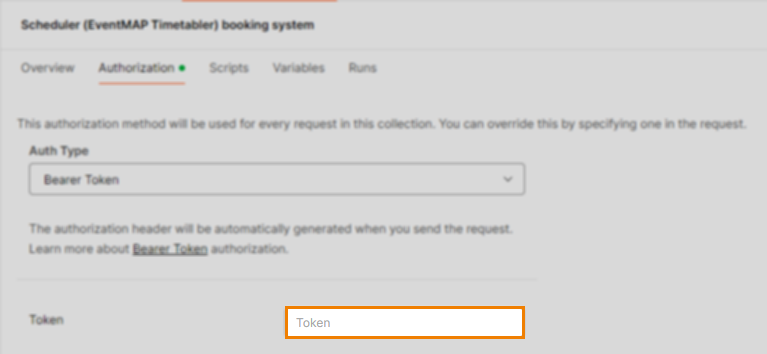
If using the ‘Scheduling System’ Postman collection, include your token in the Token field in Authorization:
All requests in the collection are configured to inherit this token.
Refreshing a bearer token
post/api/Token/Refresh
Send a request to the endpoint to refresh a bearer token.
Parameters
Parameters are passed with the endpoint to influence the response. Header parameters are included in the request header. Path parameters are extensions of the endpoint, and query parameters follow ? after any path parameters.
Name
Parameter
Input
Description
content-type
header
MANDATORY
application/json
Determines data format of the request, which must be JSON.
content-length
header
MANDATORY
{number}
Determines the number of characters passed in the body of the request, where {number} is a numerical figure. This is usually automatically calculated when the request is sent.
accept
header
OPTIONAL
application/json
Determines data format of the response, which must be JSON.
Sample request
The following request contains the minimum required request body to refresh your token.
The response body schema contains a description of every property that is returned by this endpoint.
idstring
The token’s unique identifier.
emailstring
The email address of the user who made the request.
tokenstring
The token string.
access_tokenstring
The token string.
expiry_datestring
The token’s expiry date, in YYYY-MM-DDTHH:MM:SS format.
expiresstring
The token’s expiry date, in YYYY-MM-DDTHH:MM:SS format.
issuerstring
The token issuer, which is a Scheduler instance.
refreshTokenstring
The refresh token’s string.
refreshTokenExpiresstring
The refresh token’s expiry date, in YYYY-MM-DDTHH:MM:SS format.
Authorising requests to the scheduling system
As the Surpass Test Centre Network team will set up the necessary Scheduler configurations, any requisite user permissions impacting the authorisation of requests is already handled. For more information, read Preparing to integrate with the scheduling system.
Further reading
Now you know how to connect to the scheduling system, read the following articles to learn more: